
.png)
Remote-assistance modules
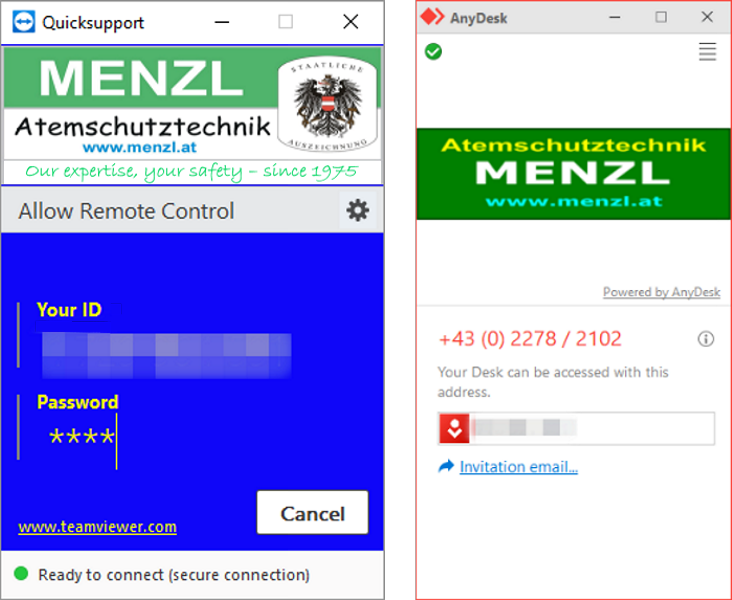
For getting real-time one-on-one support over the Internet in using our software and in troubleshooting problems
What is remote-assistance?
Our software comes with two remote-assistance modules included – QuickSupport5 (based on TeamViewer) and QuickSupportAD (based on AnyDesk). These modules make it possible for us to provide real-time, one-on-one assistance and support over the Internet in installing pieces of software, troubleshooting data-related problems and creating reports.
Activities that can be carried out by means of remote assistance
- maintaining and reviewing data
- repairing databases that may have become corrupted
- creating custom reports and making them available in the program
- installing program updates (provided you have the required OS privileges)
- installing drivers (provided you have the required OS privileges)
- downloading and uploading files
Requirements for using the remote-assistance feature
- Your computer needs to be connected to the Internet.
- You need to have the privileges required for remote assistance.
How to use the remote-assistance feature
When you launch one of the remote-assistance modules, a window displaying a computer-specific ID opens. Using this ID and a password hardcoded into the respective remote-assistance module, a MENZL staff member can connect to your computer over the Internet to help you in using our software and in troubleshooting software-related or data-related problems.